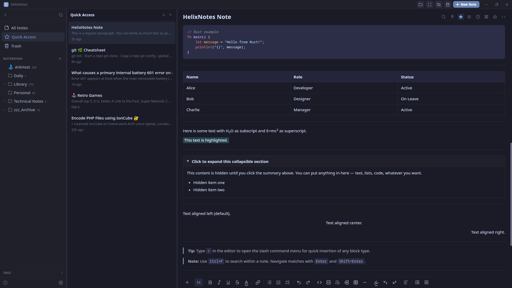
I built a note-taking app because the one I wanted didn’t exist. Clean UI, local .md files, no cloud, no account.
Built with Rust + Tauri 2.0 + SvelteKit. Full-text search powered by Tantivy. Graph view, AI writing tools (bring your own key), Obsidian import, version history.
Available for Linux (AppImage, APT, AUR), Windows, and macOS. Source: https://codeberg.org/ArkHost/HelixNotes
AI writing tools — improve, summarize, translate, and more (Anthropic / OpenAI)
why though
Fair question. Use case: you take rough notes during a meeting, no formatting, just raw thoughts. AI can clean them up, summarize, or restructure after the fact. It’s completely optional though. Disabled by default, doesn’t even show in the context menus unless you explicitly configure it in settings with your own API key. If you don’t want it, it’s like it doesn’t exist.
So, a feature for those who want it, but turned off out of the box for those who absolutely do not want it? Did I understand correctly?
Exactly. Off by default, invisible unless you enable it.
As ai features should be. You’re the dev?
Correct. Yes I am.
Cool. I appreciate this design decision. If only more went that route (looking at you, Microslop)
If it were me, I’d have chosen a different name to avoid confusion with helix the editor.
If you want to try HelixNotes, be aware it overwrites the front-matter of notes you open (view only, no edit needed).
Hi ArkHost,
Obsidian user here. I tried HelixNotes for a couple of minutes and here’s my feedback:
- I like that you support compatibility/converting Obsidian vaults. I wish you would at least support Obsidian’s wiki links directly. I won’t convert all my notes just to try if I like your editor.
- View mode doesn’t seem to really do anything. Ah wait, seems like I can only click links in view mode (no visual distinction between normal editor and view-mode apart from the tiny
view modebadge). But that opens the linked note in my default.mdviewer, not the HelixEditor itself. IMO view-mode should be visually distinct and also work together with source-mode (so I can edit in source mode and then click view-mode to see the rendered note). - I like the simple look, although the UI is not as polished compared to Obsidian.
- I need Math support (
$ ... $). - I hate that you update notes front-matter even if I just view and not edit them. Only change notes I am editing myself. I just had a look and now you changed the format of my notes. Re front-matter it would also be good if that behavior is documented somewhere.
- I closed my vault (clicked on the folder icon in the top right) and wanted to reopen it, but got an error:
Failed to acquire LockFile: LockBusy. - The graph view opened but stayed empty.
Feel free to use my feedback however you want, or don’t. Personally, there’s more than one deal-breaker for me to switch from Obsidian to HelixNotes, without even considering the nice-to-have features added by all the plug-ins. I recommend you to listen to people who are more likely to use your editor than me, or are already using it. I hope my comment doesn’t come over too negatively. I tried to give honest feedback why personally I won’t use HelixNotes anytime soon. I wish you all the best.
Appreciate the honest feedback, doesn’t come over negatively at all, this is exactly what helps improve the app.
- Obsidian wiki links not converting properly during import: that’s a bug, will be fixed in the next release.
- View mode, math support, frontmatter behavior, and the other UX points: all noted and will be considered. So far I’ve focused on features I use personally, but if something makes sense, improves the app, and keeps it focused without bloat, I just implement it.
- The LockFile bug and empty graph view: I haven’t seen this behavior yet but I’ll look into it.
HelixNotes isn’t trying to be a replacement for Obsidian. It was a replacement for Obsidian for me, but different people have different needs. Thanks for taking the time.
You even overwrite previously existing front-matters. From just looking at a note. This is a fucking no-go! Luckily I was able to revert all the unwanted changes HelixNotes applied to my vault.
This is a warning for everyone who wants to try HelixNotes with an existing vault.
The import dialog warns you to make a backup before running as it modifies files in place. That said, the frontmatter overwrite on just viewing a note is a valid bug. I’ll fix that, notes should only be modified when you actually edit them.
Fixed in v1.1.0
Oh hey I’ve been looking for “obsidian but with version history “ for a bit now.
Give HelixNotes a try :)
Thanks for all the feedback everyone. Just shipped v1.1.0 based on what was reported here today:
- Obsidian wiki link import fix
- macOS Cmd key shortcuts (was showing Ctrl)
- Frontmatter no longer modified on notes you don’t edit
- KaTeX math support
- Daily Notes
- Tag management (single + batch)
- View mode toggle + focus mode improvements
- Source mode search
- Notebook delete confirmation
- Collapsible sidebar tags
Note taking App, AI in the front page… I don’t think you understand the point of taking notes.
AI is optional, disabled by default, and doesn’t even show in the UI unless you enable it. The app works fully offline with zero AI involvement.
Does this have anything to do with the Helix text editor?
No, completely separate project. Just a coincidence in naming.
Never worked with any note taking apps except for Vim with customized snippets and rudamentary helper scripts.
While such an app seems very appealing, I haven’t seen any of them featuring the useful stuff, such as pluggable editor (in my case Vim or NeoVim), template support (day journal, meeting, README etc…), rendered fields (e.g.: today, author, or arbitrary values), support for pandoc rendering, doc metadata management (tags, keywords, related docs, links) or markers in text eg. @TODO etc… (idea being to aut. create lists of paragraps with such markers)
What’s the point of a note taking app that provides help with editing single docs and maybe with rendering to HTML, but doesn’t help organizing and remembering stuff?
Different use case. HelixNotes is for people who want a clean, simple note-taking app that works out of the box - not a customizable text processing pipeline. If Vim snippets work for you, stick with that. Not every tool needs to be for everyone.
Looks like an interesting project!
Could you please consider publishing it to Flathub?
It’s on the list. Flatpak packaging is coming.
Not the developer, though that could be an option for sure. I’d highly recommend looking at the security holes for Flatpak, and it’s got a ton of them. They’re getting fixed, though I don’t even have Flatpak installed on my machine.
Are there security issues specific to Flatpak? I would have thought it’d be more secure than Appimage, since it’s sandboxed.
While it is sandboxed, a Flatpak can have this happen to it (from the time): https://flatkill.org/
How does this differ from every other distribution method, though? You can just as easily do something malicious with an Appimage or Debian/rpm package.
Is the Markdown editor WYSIWYG, like Typora ?
You have both - the WYSIWYG editor and a way to switch to the Markdown editor.
I specifically asked whether the Markdown editor is WYSIWYG, like Typora, which isn’t the same thing as MS Word WYSIWYG.
Not like Typora, no. HelixNotes has a WYSIWYG editor and a source mode toggle, two separate views. Not inline markdown rendering.
Since this looks to be similar to Obsidian, why not name it something else like it, but without the Obsidian name?
I’ll need to do some numerology on that…
EDIT: On the note of Obsidian, my producer and I use it all the time, however, there is another one that someone in a community I’m in looked at, that being Trilium Next. Judging by the looks, it’s got similarities to Trilium, which is actually pretty nice.
The name comes from the double helix. Structured but flexible, like how notes should be. Trilium is a solid project, but it stores notes in an SQLite database and runs on Electron. HelixNotes keeps everything as plain .md files and uses Tauri, so much lighter on resources.
Is Tauri like Electron, or SQLite, but faster and FOSS? Are either of those what I’m getting at?
Tauri is an alternative to Electron. Both are frameworks for building desktop apps with web technologies, but Electron bundles a full Chromium browser (which is why Electron apps use so much RAM). Tauri uses your OS’s native webview instead, much smaller, much lighter. Both are open source. The difference is resource usage.
Since my producer and I are using the Odin Project to potentially learn full-stack JS after the foundations course completion on our end (Rails is another option for full-stack development), we could certainly look into Tauri (even if we’re not done with that yet). I wonder, however, why many apps don’t use Tauri, and instead, Electron.
Electron came first and has a massive ecosystem. Most apps were built before Tauri was mature enough. Switching frameworks is expensive, so existing apps stay on Electron. New projects are increasingly picking Tauri though.
Plugin support?
Not at this stage. It’s something I’m considering but the priority is getting the core experience right first.
Totally understandable at this stage. As soon as it appears on the roadmap I’m in. Need my templater :)
Does this have multi vault support?
Not yet, but it’s a straightforward feature to add. Open an issue on Codeberg and I’ll get it on the roadmap.
Isn’t this basically just an Obsidian replacement then? I haven’t tried it, but reading the info in Codeberg does point to that.
Is it possible to view files in the root of the vault?
Also, is it possible to show non.mdfiles?My use case for the second question is that I have
.pdfand.xmlthat acompanies my notes. Having HelixEditor showing them as well (or opening them in system default editor) would be nice.