
From their repo:
Plasma Login
Plasma Login provides a display manager for KDE Plasma, forked from SDDM and with an new frontend providing a greeter, wallpaper plugin integration and System Settings module (KCM).
What we want
- Great out-of-box experience in multi-monitor and high DPI and HDR
- Keyboard layout switching
- Virtual keyboards
- Easy Chinese/Japanese/Korean/Vietnamese (CJK) input
- Screen readers for blind people (which then means volume control)
- Remote (VNC/RDP) support from startup
- Deeper Plasma integration including:
- Display and keyboard brightness control
- Full power management
- Pairing trusted bluetooth devices
- Login to known Wi-Fi for remote LDAP
No AI? Are they allowed to do that? Are you sure?
- Types in username and password
“Perfect! You are now logged into your computer. Enjoy your desktop!”
- Nothing happens. Try to log in again
“You’re absolutely right, I failed to log you in while claiming you had actually logged in. Good catch! I’ll log you into your system now. Have fun!”
- Nothing happens
Made me laugh
Already created a issue ticket /s
Feature request: AI password validator , because who needs central directory anyway
Letting AI decide if I entered the correct password is so much better than actually storing the passwords in an encrypted keychain (which can be hacked!!!). AI is revolutionizing security. This is the way of the future. /s
I demand a KoChauffeur+ button. How are we supposed to login to our computer without a
slopchatbox!?
Very cool. I’m consistently impressed by the KDE devs.
Thank god SDDM is a nightmare
What’s bad about SDDM?
It always chooses the default highest resolution, (which may not work on some devices with faulty EDID), does not respect the Wayland/X11 choice, has a long pause when going from login screen to desktop and does not support 24h clocks.
Just to name a few.
has a long pause when going from login screen to desktop
Yea I have noticed this. It takes a long time to switch back as well when you lock the computer, logout, switch users, etc
The first one I think is a fundamental limitation in that display preferences by default is per-user. Maybe this makes it work for you? https://feddit.online/post/1350756/comment/6636228
The 24h clock might be similar - check your system-wide locale.
The first one I think is a fundamental limitation in that display preferences by default is per-user. Maybe this makes it work for you? https://feddit.online/post/1350756/comment/6636228
I don’t really have this problem anymore since I got rid of my projector which advertised a resolution it couldn’t handle. Had to login into the void since the login screen never showed up. Looks like this might be fixable nowadays.
The 24h clock might be similar - check your system-wide locale.
The locale is set to American English but the time format is set to German, something the lock screen can handle but SDDM cannot. I also tried applying the Plasma settings to SDDM a few times but it doesn’t really change anything.
My biggest issue: no support for rdp
Pet peeve: In immutable distros you can’t change the background image… and I happen to strongly dislike Aurora’s artwork. I run Aurora on my work laptop, and my login screen looks like some kind of a bizarre childish acid trip. Embarrassing to say the least, but the distro itself is top notch.
Things I’ve run into:
-
Out of the box, the lock screen comes on after screen unblanking - late enough that when things aren’t snappy you can briefly catch the desktop without reauthing.
-
Sometimes randomly after wake, keyboard input is not recognized in the password field at all. Except for Esc, which in this state appears to crash-restart it and makes it work again
-
With a multi-monitor setup, I have still not been able to properly force the primary monitor. Is an issue because things like notifications and the login input will only show up on a usually turned off projector. This one might be PEBCAK.
I have issues 1 and 3 with XFCE on lightdm, too, though.
I have the same multiple monitor issue. I have an ultrawide on display port, and a smaller monitor on hdmi. Boot messages default to the ultrawide but the login prompt also defaults to the secondary display. Minor thing I know, but irritating.
I’ve definitely noticed #2 and #3, very annoying! They should both show the same text input (not a straight display clone since they might be different resolutions/ratios)
On a side note, I’ve noticed some Linux installers don’t handle multiple screens well or high resolutions. I think Calamares is a big offender here, it doesn’t clone to every display so I end up stuck trying to use my sideways monitor. Or on a 4k screen everything is tiny for no reason, it should just default zoom on high resolution.
I much prefer the installers that are just a regular window on a normal desktop, where you can move it, maximize it, easily access the DPI settings and other system settings, browse the internet while it’s installing…
SDDM does lock screen? But that’s a screen locker’s job. In this case, you can likely disable it in some ssdm.conf and use any alternative locker instead (also note the List_of_applications/Security#Screen_lockers there).
The lock screen and display manager are two separate pieces of software. The display manager runs before a user profile has been selected for graphical login, so it does not have access to your user desktop/display settings
there’s a button to apply Plasma settings to SDDM for this purpose, it prompts for admin password when you do it, which makes sense
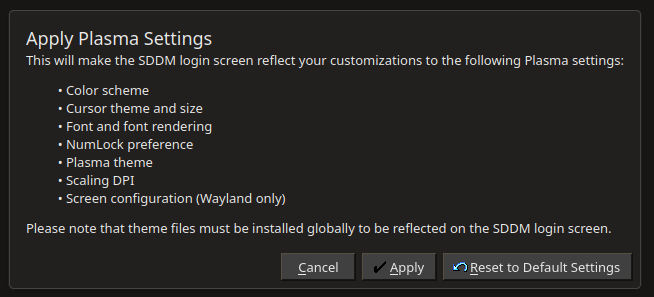
Supposedly both the display manager and greeters have system-wide configuration for this purpose, however. And the issue with notifications and DE overlays are present post login, too.
-
problem with password expiry https://github.com/sddm/sddm/issues/472
Damn. I wonder when this trickles down to CachyOS and Bazzite.
Quickly in Bazzite, not at all in Cachy since that’s based on Arch.
What kind of argument is that?
It’s already in AUR, you can install it right now if you want.
Right, but since it isn’t based on Fedora, which this post is about, what Fedora is doing has no bearing on what CachyOS uses as its defaults.
Except they responded to a post talking about an Arch-based distro, so Fedora isn’t relevant here.
Cachy already switched the default to it over a month ago in a beta ISO, but then they reverted it because it wasn’t stable.
In Bazzite it’s usually between same day and 24 hours, since the build process is fully automated.
looking forward to it, sddm is the only thing I have left that depends on xorg directly
You can set it to use Wayland!
it didn’t work for me when I tried it so I’m sitting out till the new thing is available
Fedora will be the first distro? Adopting it even faster than KDE Neon, a distro made by KDE itself?
KDE neon is really only a development platform, and it is barely maintained.
Ah, TIL. I just figured it was the KDE-est general-purpose distro.
But still, shouldn’t it at least have a development version of Plasma Login Manager sooner than any others, for testing?
it probably does, but it isnt considered a ‘real’ distro since it isnt suitable for non-development use (nor is it meant to be). its a very common misconception about KDE neon to think that since it’s the KDE branded one it must be the best general-purpose KDE distro.
thats why they are making KDE Linux. KDE Linux is going to be what a lot of people mistakenly take neon to be while also fulfilling the role of ‘development standard implementation/example implementation for distros to reference’ much better.
Did you look this up?
What do you think is more likely - that KDE Neon does not have a testing version of Plasma Login Manager or that a sensationalistic news headline is not giving you a 100% accurate and complete understanding?
KDE Linux will probably have it first.
Edit: nevermind. https://invent.kde.org/kde-linux/kde-linux/-/merge_requests/350
where are the screenshots
Asking the real questions!
Easy Chinese/Japanese/Korean/Vietnamese (CJK) input
This reminds me of what a pain in the it was for me to get an IME working. I may not be smart, but even accounting for that, it was unnecessarily complicated.
bravo
Anyone here with XFCE and lightdm???
If you update from 43 to 44, will it still remove SDDM? Or does it get stuck as part of your user config?
It will depend on how upstream (Fedora Silverblue) implements it. From my understanding, it will straight up replace it, and remove SDDM.
No built-in VPN support for remote desktop? 😢
No built-in VPN support for remote desktop? 😢