The moment one of those Linux users see that I said Ubuntu they’re going to froth at the mouth and lose their entire minds. It’s like their identity is tied to only using the most obscure, unpopular nonsense.
It’s easy enough - and the Snap store (app) is good enough for what you’d need. Its not the best in some situations, but if you’re not doing anything crazy and you just want to search web or whatever without all the surveillance and copilot slop being forced onto you - it’s a good start.
It’s a learning curve, but it’s not bad. I use Libre Office instead of MS Office now. Shortcuts and interface still fucks with me after growing up with MS Office products.
I dual boot Linux and windows on both my machines. When I game - I boot up windows. When I do anything else, I boot up Linux.
Gaming is the thing, I have kept my ear to the ground and gaming is much better than it was but it’s still a bit to go. I have a streaming laptop I no longer use, I may put Ubuntu or something on there. Test it out. I have some familiarity with Linux but my understanding the user experience has gotten a lot better since 10+ years ago.
Pick one. Use it for a while. Try a different one.
If you just want something that works out of the box and are very new to Linux, I’d grudgingly recommend Ubuntu, and highly recommend Debian-based mint.
(Ubuntu is easier to get started but I’m not a fan for a few reasons.)
If you’re familiar with Linux or don’t mind jumping into a learning curve, Endeavor OS is my current driver, and I’m liking it.
Just pick one, burn the ISO to a USB stick and run a live version. When your done checking it out, shut down, unplug the USB stick, and boot back into windows. You can do this with any distro you are curious about, and once you find one you feel comfortable with you can install it.
My mom hates windows but is also uncomfortable with moving to a new OS, so this is what I did for her. She settled on Mint and now I’m taking an old laptop my dad gave me and I’m going to install Mint on that so she can use it full time but still have her windows machine for the time being. Once she’s comfortable with Mint I’ll move her over completely with the current windows computer since it’s far more up to date and powerful.


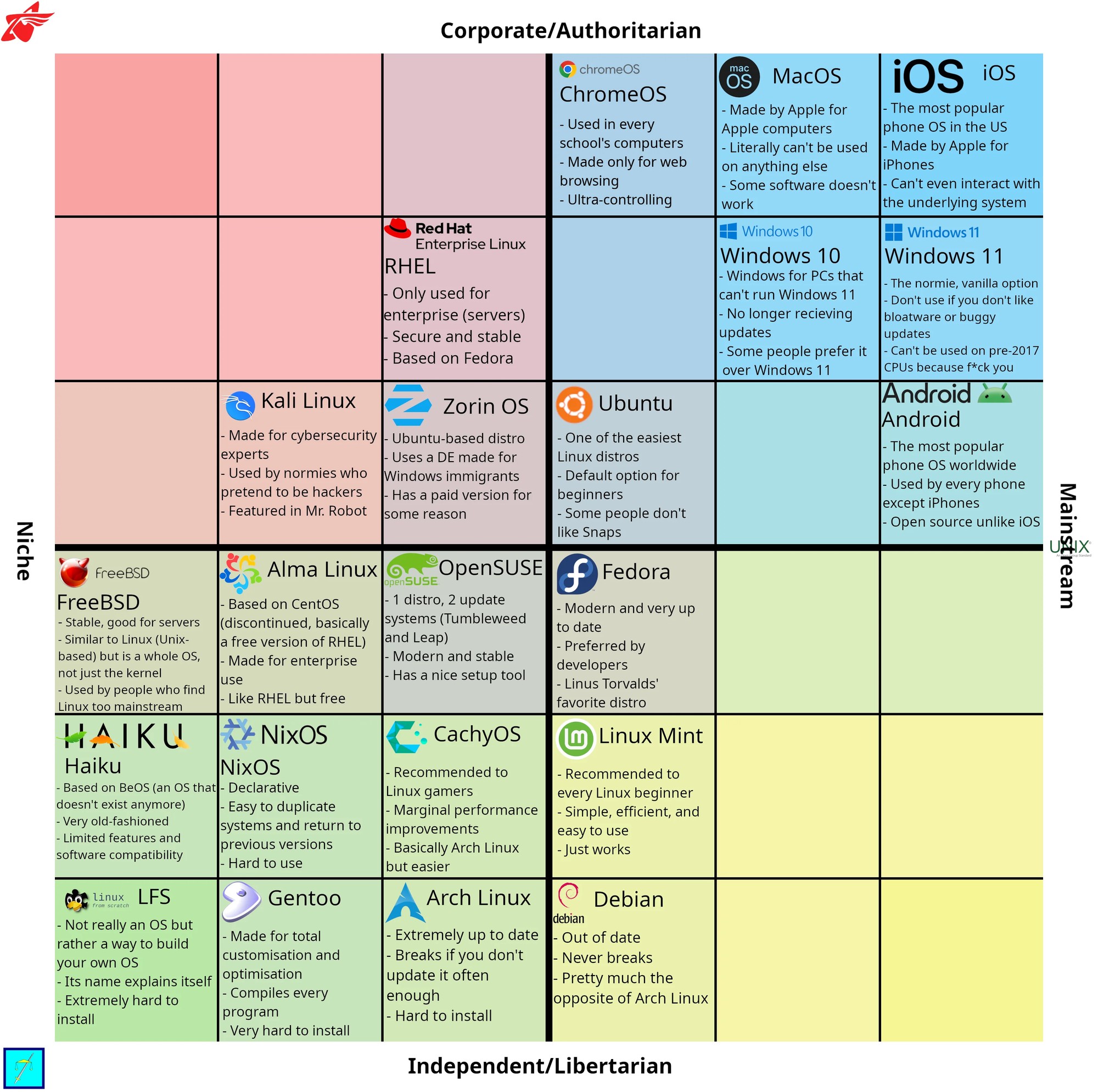
I’ll be honest, I hate Windows 11 but the plethora of Linux distros as well as opinions on them gives me serious decision paralysis.
Just get a feel and poke around.
The moment one of those Linux users see that I said Ubuntu they’re going to froth at the mouth and lose their entire minds. It’s like their identity is tied to only using the most obscure, unpopular nonsense.
It’s easy enough - and the Snap store (app) is good enough for what you’d need. Its not the best in some situations, but if you’re not doing anything crazy and you just want to search web or whatever without all the surveillance and copilot slop being forced onto you - it’s a good start.
It’s a learning curve, but it’s not bad. I use Libre Office instead of MS Office now. Shortcuts and interface still fucks with me after growing up with MS Office products.
I dual boot Linux and windows on both my machines. When I game - I boot up windows. When I do anything else, I boot up Linux.
Gaming is the thing, I have kept my ear to the ground and gaming is much better than it was but it’s still a bit to go. I have a streaming laptop I no longer use, I may put Ubuntu or something on there. Test it out. I have some familiarity with Linux but my understanding the user experience has gotten a lot better since 10+ years ago.
Pick one. Use it for a while. Try a different one.
If you just want something that works out of the box and are very new to Linux, I’d grudgingly recommend Ubuntu, and highly recommend Debian-based mint.
(Ubuntu is easier to get started but I’m not a fan for a few reasons.)
If you’re familiar with Linux or don’t mind jumping into a learning curve, Endeavor OS is my current driver, and I’m liking it.
Linux Mint is just Ubuntu but better, I strongly recommend it
Just pick one, burn the ISO to a USB stick and run a live version. When your done checking it out, shut down, unplug the USB stick, and boot back into windows. You can do this with any distro you are curious about, and once you find one you feel comfortable with you can install it.
My mom hates windows but is also uncomfortable with moving to a new OS, so this is what I did for her. She settled on Mint and now I’m taking an old laptop my dad gave me and I’m going to install Mint on that so she can use it full time but still have her windows machine for the time being. Once she’s comfortable with Mint I’ll move her over completely with the current windows computer since it’s far more up to date and powerful.